
Device
Devices are automatically detected by TestRack UI when they are connected. The detail view can be found in
the left sidebar under Application > Devices. Here all previously and currently connected Devices are
listed, with an indicator on the right to show their connection status. When one of the Devices is
selected, the right detail view shows a selection of current data about the device.
Device Types
Section titled “Device Types”There are two different types of Devices in TestRack UI. Normal burn-in Devices are shown in the test-rack order, while the Spectrum Devices is shown separately.
Device Panel
Section titled “Device Panel”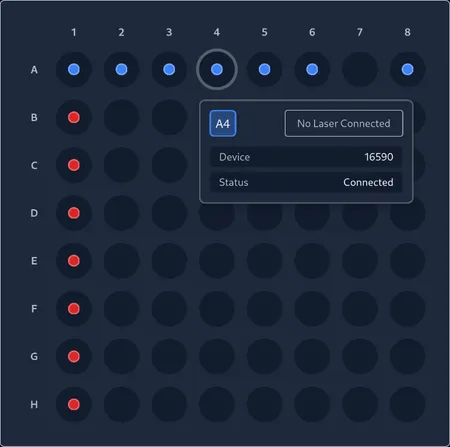
An overview over all Devices is shown directly on the dashboard.
Here all burn-in Devices are shown in their repsective order within the test-rack.
Hovering over each connected device reveals a hover card with up-to-date information about the device.
When a Test Sequence is currently running on a device this is indicated through a spinner on the outer ring of the Device indicator.
Clicking the device indicator brings you to the Device detail view in Application > Devices.